

// USE-CASE · QHSE / PREVENTION
Safety and quality.
Finally, no more
Excel.
Workwear, certificates, training, workplace inspections, incidents — everything your prevention adviser and QHSE coordinator manage day to day, in one place. Demonstrably compliant, quickly retrievable, automatically followed up.
Certificates in an Excel file.
Workwear in Marc's head.
Incident reports in someone's mailbox.
And when the inspector calls, you spend three days searching.
Time for one QHSE working environment.
// THE FIVE PILLARS OF QHSE
Five domains. One working environment.
QHSE consists of several sub-domains, each requiring its own follow-up and evidence. Ishtar365 brings them together — without custom development and without consultants.
Workwear
Requests, approvals, assignments — everything in one working environment. With an annual overview per employee.
Certificates
Validity and expiry dates of all employee and machine certificates. Automatic alerts before they expire.
Training
Who completed which training, and when? Mandatory refreshers, certificates and proof centrally stored.
Workplace inspections
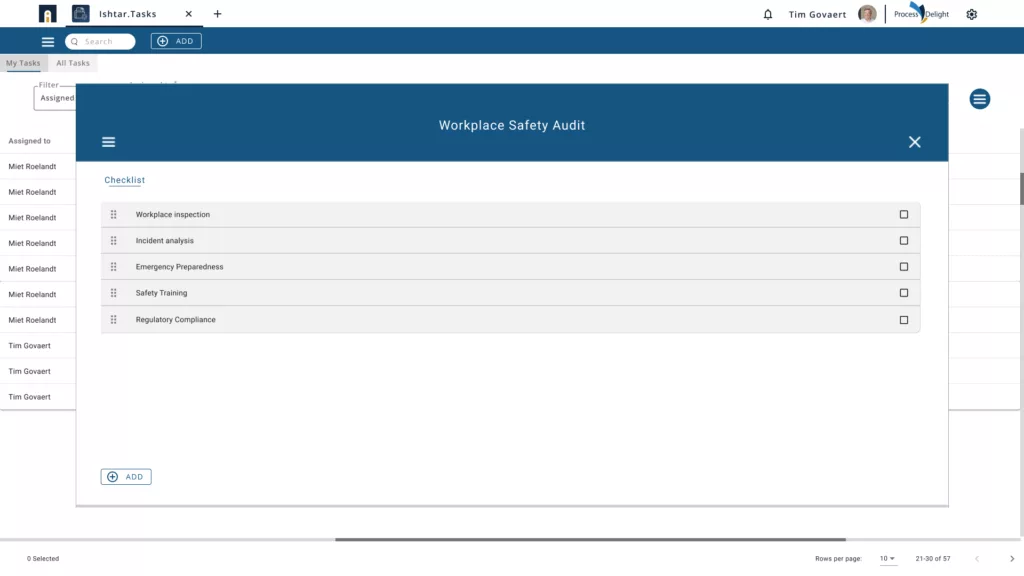
Periodic rounds with checklists per site. Findings, photos and follow-up actions directly in one report.
Incidents
Registration, root-cause analysis and preventive measures for every workplace accident or near-miss. With audit trail.
// PILLAR 01 · WORKWEAR
Who received what? Finally an answer.
The entire workwear process in one working environment: requests, approvals and assignments — with immediate insight into what each employee has already received this year.
- Request and approval workflow for every request
- Assignment per employee with signature for receipt
- Annual overview per employee: who got what and when
- Insight into the data: who is above average, who hasn't received anything yet
// PILLAR 02 · CERTIFICATES
No certificate that expires unnoticed.
From VCA certificates to ADR, first aid and machine inspections — all proof centralised, with automatic alerts before expiry.
- Validity periods per certificate with alerts 90/30/7 days ahead
- Proof directly linked to the certificate
- Per employee, per machine, per site
- Audit report exportable in one click
// PILLAR 03 · TRAINING
Who has completed which training?
An overview of all training completed per employee — mandatory or voluntary — with refresher dates and proof.
- Completed training per employee, with date and certificate
- Mandatory refreshers automatically scheduled
- Skill matrix per team or department
- Links to certificates where relevant
// PILLAR 04 · WORKPLACE INSPECTIONS
Inspections without clipboards and loose sheets of paper.
Periodic workplace rounds with digital checklists, photos for findings and automatic follow-up actions to the right person.
- Checklists per site or type of workplace
- Photos and notes directly from your phone
- Findings → automatic follow-up tasks
- Historical reports per zone, comparable over time
// PILLAR 05 · INCIDENTS
Every incident is an opportunity to fix something structurally.
From near-misses to workplace accidents — structured registration, root-cause analysis and preventive measures that are actually followed up.
- Quick reporting via phone or form
- Root-cause analysis using the 5 Whys or bowtie method
- Preventive measures → automatic tasks with deadlines
- Statistics per site, type, frequency
QHSE the way it really should work.
One working environment for your prevention adviser, your QHSE coordinator and your line managers. Up and running in days, managed without consultants.
Frequently asked questions about QHSE software
What exactly does QHSE software do?
QHSE software brings together all the daily tasks of your prevention adviser and QHSE coordinator in one working environment: workwear, certificates, training, workplace inspections and incidents. Instead of scattered Excel files and emails, you have one place where everything is registered, followed up and evidenced.
Which companies is this suited for?
Any organisation with operational risks and regulatory obligations: manufacturing, construction, logistics, maintenance, chemicals, food, healthcare. Whether you have one site or multiple locations with subcontractors — Ishtar365 scales with you and is configurable without custom development.
How do we know we're audit-ready?
Every action is automatically logged with date, user and supporting evidence. Certificates, inspection reports, incident analyses and training records are stored centrally and exportable in one click. During an audit, you retrieve in minutes what would otherwise take days to find.
Do we get automatic alerts for expiry dates?
Yes. For every certificate — VCA, ADR, first aid, machine inspections — you set alert thresholds (for example 90/30/7 days in advance). The right person is notified in time so renewals can be scheduled before anything expires.
How long does implementation take?
A basic rollout covering the five pillars is typically live within 4 to 8 weeks. More complex setups with multiple sites, HR/ERP integrations or specific checklists take 2 to 4 months. We work in sprints so you see value from week one.
Stay up to date.
Sign up for our newsletter and receive the latest insights and updates on future-proof working straight to your inbox.